

Disclosure: Feedlyy is made by Nowbrief’s founder. This is our own account of using the extension, not an independent test, and nobody paid for it.
Anyone who plans social media content knows the routine: open a competitor’s Instagram profile, scroll for ten minutes, and guess which posts actually worked. We have been using Feedlyy, a free Chrome extension built in India, to do that research for us, and it has changed how we look at both Instagram posts and Facebook ads.
Feedlyy is listed on the Chrome Web Store and works inside the browser. It reads the page you already have open, so there is nothing to log in to and no account to connect.
How we used it on Instagram
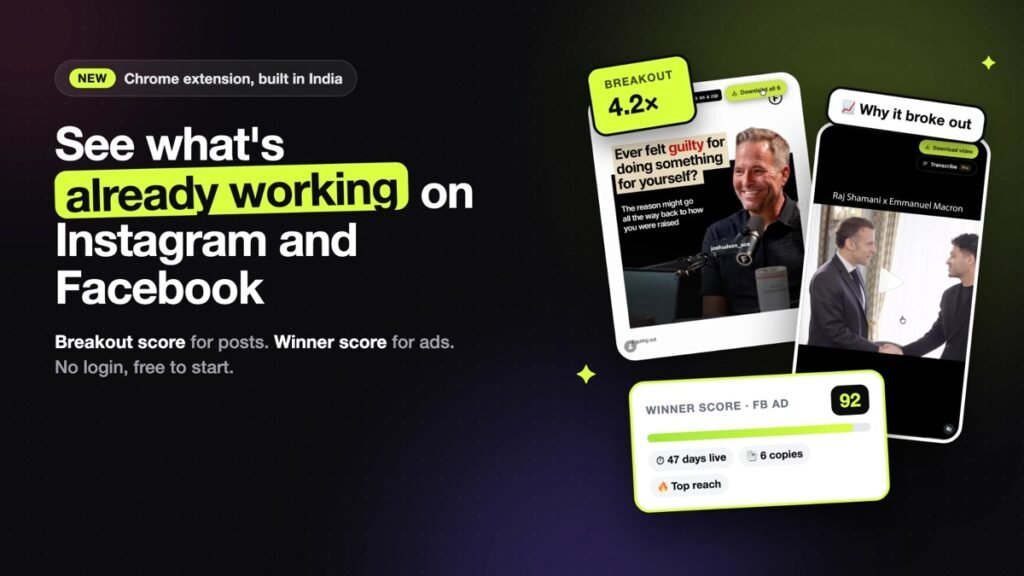
Our first test was simple. We opened a public Instagram profile in Chrome, clicked the Feedlyy icon, and the profile turned into a grid of posts ranked by a “Breakout score”.
The score compares each post with that creator’s own usual numbers: likes (or views, on the Reels tab) divided by the median of their recent posts. A score of 2.0× means a post did twice as well as normal for that account. Because it uses the median rather than the average, one old viral hit does not distort the picture.
This was the part we found most useful. A post with 50,000 likes can be ordinary for a large creator, while a post with 8,000 likes can be a big win for a smaller one. Sorting by Breakout score surfaced posts we would have scrolled straight past.
Clicking “Why it broke out” on a post gave us a short explanation based on the profile’s own numbers, such as comments running far above normal, plus the post’s opening line labelled by hook type (a question, a number, a list, a how-to and so on). It also suggests a few fill-in-the-blank hooks for writing your own version.
Reels, similar accounts and exports
Two features sit in the paid Pro plan. Transcribe turns a Reel into timestamped text, which made it much quicker to study how a video opens than rewatching it. Niche finder lists up to 50 similar accounts, which helped us check whether a format works across a niche or only for one creator.
For sharing with a team, research can be saved to collections and exported to CSV, Excel or JSON. There is also a download button for saving a post’s photo, Reel or carousel slides for reference.

How we used it on the Facebook Ad Library
The second half of the extension works on Meta’s public Ad Library, where anyone can see the ads running on Facebook and Instagram. The library shows every ad the same way, so it is hard to tell a test from a long-running winner.
With Feedlyy switched on, each ad gets a “Winner score” from 0 to 100, built from signals the library already shows: how long the ad has run, how many copies of it are live, and where Meta ranks it by impressions. The idea is that brands usually switch off losing ads within a week or two, so an ad still running after a month, in several versions, is probably working.
We found the filters the most practical part: sorting by Winner score, longest running or most copies, and narrowing by date or by video, image and carousel ads. Opening an ad shows its hook, offer and landing page, every version of the creative, and an estimated spend range.
What to keep in mind
- Spend figures are estimates. Meta does not publish spend for commercial ads, so no tool can show the real number. Feedlyy labels its estimates with a confidence level.
- It only reads. Feedlyy never asks for your Instagram or Facebook password and does not post, like, follow or comment for you. Transcription is the one feature that sends audio to Feedlyy’s servers. Its safety page lists what it can and cannot do.
- The free plan is limited. It covers the latest 25 posts from the last 7 days on Instagram and 5 full ad insights a month. Pro costs ₹350 a month (about $4) and Pro + Ads costs ₹499 a month (about $6); see the pricing page.
- Coverage is narrow for now. It works on Instagram and the Meta Ad Library only. Facebook Reels and YouTube Shorts are listed as coming soon.
Try it yourself
If you plan content or ads, the free version is enough to see whether the approach suits you. Feedlyy is free to add to Chrome; open any public Instagram profile or an Ad Library search and click the extension. For more on the technology business, see our Tech section.